







Introduction: Why You Should Understand Database Schema
When learning databases, SQL, or backend development, one of the most important foundational concepts is the database schema. Many beginners start writing SQL queries without truly understanding how a database is structured. This often leads to confusion, errors, and poorly designed applications.
A database schema acts like a blueprint that defines how data is organized inside a database. If the schema is weak, your data becomes messy, slow, and difficult to manage. In this blog, we will explain database schema in simple language, with real examples, so even beginners can understand it clearly.
What Is a Database Schema?
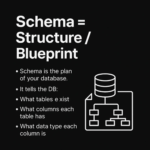
A database schema is the logical structure of a database. It defines how data is stored, how tables are organized, and how different tables are connected to each other.
In simple words:
A database schema is the design or blueprint of your database.
It tells the database:
- What tables exist
- What columns each table has
- What data type each column uses
- How tables are related to each other
Schema = Structure / Blueprint
Think of a database schema as a plan before construction.
Just like you cannot build a house without a blueprint, you should never store data without defining a schema first.
The schema answers questions such as:
- What information will be stored?
- How will it be grouped?
- How will different data connect?
Without a schema, your database becomes unorganized and unreliable.
What Does a Database Schema Contain?
A database schema typically includes:
1. Tables
Tables store data in rows and columns.
Example: students, courses, orders
2. Columns
Each table has columns that define what data is stored.
Example: id, name, email
3. Data Types
Each column has a data type such as:
- INT
- VARCHAR
- DATE
- BOOLEAN
4. Keys
- Primary Key (PK) – uniquely identifies a row
- Foreign Key (FK) – links one table to another
Think of Schema Like a Building Plan
A very easy way to understand database schema is by comparing it to a building plan.
- Rooms = Tables
- Walls = Columns
- Doors = Relationships
Without a plan, the building will collapse.
Without a schema, your database becomes slow and inconsistent.
Database Schema Example: School Application
Let’s understand database schema using a School App example.
Students Table
Stores student details:
- id
- name
Courses Table
Stores course details:
- id
- name
- teacher_name
Enrollments Table
Connects students and courses:
- id
- student_id
- course_id
This design allows:
- One student to enroll in many courses
- One course to have many students
This is a real-world database schema used in most applications.
How Tables Are Linked (Foreign Keys Explained)
Tables in a database are connected using foreign keys.
student_idin enrollments → points tostudents.idcourse_idin enrollments → points tocourses.id
These links ensure:
- Data consistency
- No invalid records
- Faster querying
Foreign keys are what make relational databases powerful.
Schema vs Data (Very Important Difference)
Many beginners confuse schema with data, but they are not the same.
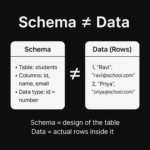
Schema
- Defines structure
- Tables, columns, data types
- Does NOT change frequently
Data
- Actual rows stored inside tables
- Changes every day
- Comes and goes
Example:
- Schema: students table with id, name, email
- Data: Ravi, Priya, Amit records
Schema = design
Data = actual information
Why Database Schema Matters So Much
A well-designed database schema:
Keeps Data Organized
No duplication, no confusion, clean structure.
Avoids Duplicate & Messy Data
Prevents storing the same information again and again.
Makes Queries Faster
Optimized structure improves performance.
Helps Teams Understand the System
Developers, analysts, and DBAs can easily understand the database.
Supports Scalability
Good schema design allows applications to grow smoothly.
Database Schema in SQL
In SQL databases like MySQL, PostgreSQL, and Oracle, schema plays a critical role.
- Tables are created using schema rules
- Relationships are enforced using keys
- Queries rely on schema structure
Without understanding schema, SQL learning remains incomplete.
Common Mistakes Beginners Make
- Creating tables without planning
- No primary keys
- No foreign key relationships
- Storing everything in one table
- Changing structure frequently
All these issues come from ignoring schema design.
Schema in One Line (Final Recap)
A database schema is the blueprint of your database — it defines tables, columns, data types, and how everything is connected.
Who Should Learn Database Schema?
- SQL Beginners
- Backend Developers
- Data Analysts
- Data Engineers
- Full Stack Developers
- DevOps Engineers
Understanding schema is mandatory for anyone working with data.